Animated Widget 1.7.3 is released. This is minor release with no new functionality - some bugs were fixed, translations for several languages were updated.
Monday, September 30, 2013

Saturday, June 29, 2013
Animated Widget 1.7.1 released
Animated Widget 1.7.1 is released on Google Play. This is minor release that fixes some critical bugs. In particular:
- Partly fixed the problem with incorrect resizing of widgets on non-standard launchers with grid 5x5 (i.e. Go Launcher Ex, Nova Launcher). Now widget has correct proportions on grid 5x5, but has a smaller size.
- Fixed compatibility of the application with Android 3.X
- Fixed some critical errors which led to crash on application.
Sunday, June 16, 2013
Animated Widget 1.7 is released
Changes in Animated Widget 1.7:


- API 17 is used, menu button is replaced by action bar.
- Possibility to customize shortcut title, skin, text color and skin color.
- Auto colors for single contacts
- Subcontacts inherites properties of parent group contact.
- Support of native videocalls
- Support of Viber 3, doesn't support Viber 2 anymore
- Two text styles: shadow (old) and outlined (new)
- Filters in ther list of applications and bookmarks
- Holo theme is used under Android 4


Monday, May 27, 2013
Animated Widget and Next Launcher
It looks like Animated Widget is incompartible with current version of Next Launcher 3D (v.1.32). When you click on the widget the buttons appear at the top of screen no matter where the widget is located.

The source of the problem is in incorrect screen coordinates that function Intent.getSourceBounds returns to Animated Widget under Next Launcher 3D. As soon as this function is the only way to know screen coordinates of the widget, widget is forced to use incorrect coordinates and shows itself in wrong possition of the screen.
Hope, developers of Next Launcher 3D will fix this problem in next versions. There is no convenient way to fix it on the side of Animated Widget.

The source of the problem is in incorrect screen coordinates that function Intent.getSourceBounds returns to Animated Widget under Next Launcher 3D. As soon as this function is the only way to know screen coordinates of the widget, widget is forced to use incorrect coordinates and shows itself in wrong possition of the screen.
Hope, developers of Next Launcher 3D will fix this problem in next versions. There is no convenient way to fix it on the side of Animated Widget.
Animated Widget BETA 1.7 is available
The beta version of Animated Widget 1.7 is available on market.

Main changes:

Main changes:
- API 17 is used, menu button is replaced by action bar;
- possibility to customize shortcut title, text color and skin color;
- auto colors for single contacts;
- subcontacts inherites properties of parent group contact;
- support of native videocalls;
- support of Viber 3, doesn't support Viber 2 anymore;
- two text styles: shadow (old) and outlined (new);
- filters in ther list of applications and bookmarks;
- holo theme is used under Android 4.
Monday, February 25, 2013
3D Weather for Android: Free Weather Forecast App with Realistic 3D Effects
MobilityFlow and Kbitubit today announce the release of 3D Weather, their jointly developed app for Android. 3D Weather is a free weather forecast application with animated 3D effects, multiple locations and Share Weather feature.
3D Weather for Android offers the users a visual weather forecast with stunningly realistic effects. The current version of the app displays three flags of the user´s country of location, which are exposed to precipitation, wind, sunshine and other vividly depicted weather phenomena.
The basic features of 3D Weather:
In the nearest future the app will support the following new features:
3D Weather is a free application. Android 2.2 or higher is required.
YouTube: https://www.youtube.com/watch?v=i56jv-vBsG8
Google Play: https://play.google.com/store/apps/details?id=com.mobilityflow.weather3d
Facebook: http://www.facebook.com/3dWeather
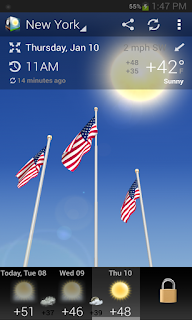
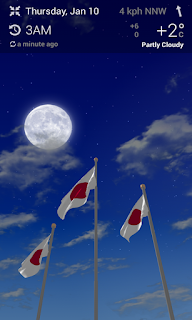
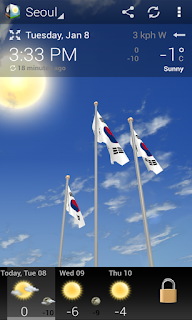

3D Weather for Android offers the users a visual weather forecast with stunningly realistic effects. The current version of the app displays three flags of the user´s country of location, which are exposed to precipitation, wind, sunshine and other vividly depicted weather phenomena.
The basic features of 3D Weather:
- Animated 3D flags;
- Animated 3D weather effects;
- Share Weather feature;
- Multiple locations.
In the nearest future the app will support the following new features:
- Weather notifications;
- Live Wallpapers and Widgets;
- More 3D objects (the Statue of Liberty, Big Ben, the Eiffel Tower, the Kremlin and other remarkable sights);
- Hourly weather forecast;
- Detailed weather data;
- Lunar phases, Sun activity and more.
3D Weather is a free application. Android 2.2 or higher is required.
YouTube: https://www.youtube.com/watch?v=i56jv-vBsG8
Google Play: https://play.google.com/store/apps/details?id=com.mobilityflow.weather3d
Facebook: http://www.facebook.com/3dWeather


Sunday, December 9, 2012
Group actions in Animated Widget
Animated Widget Group Contact supports possibility to send email/SMS to several contacts. You can't arbitrary set of contacts - you are able to select from contacts, registered in Group Contact only.
For example:
Subscribe to:
Posts (Atom)